


Google Enhances Drive, Slides, and Sheets with Gemini AI Features
In a strategic move to deepen user engagement, Google has announced new features for Google Drive aimed at transforming it from a simple storage solution into an active knowledge base. These enhancements will also extend to Google Slides and Sheets, effective immediately for AI Pro and AI Ultra subscribers, along with Gemini Alpha business customers who use US English.
Revolutionizing Google Drive
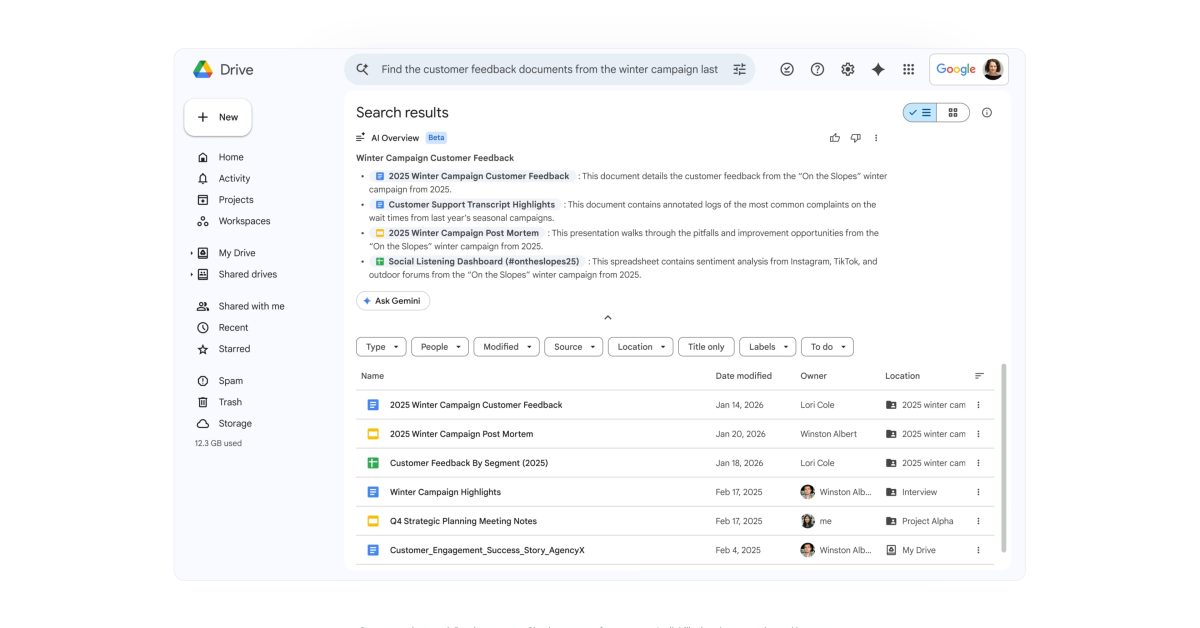
Google Drive’s search functionality is undergoing a significant upgrade, reminiscent of the revamps introduced in Gmail earlier this year. The introduction of AI Overviews seeks to supersede traditional keyword searches with semantic capabilities capable of delivering a curated list of documents or comprehensive answers with citations.
For instance, a user might inquire, “Help me find customer feedback from the winter 2025 campaign.” Leveraging advanced reasoning, Gemini will efficiently summarize pertinent details, enhancing user experience and productivity.
Additionally, the “Ask Gemini” feature allows for an interactive exploration of content. Users can pose questions and receive detailed responses drawn from their files, as well as data from Gmail, Calendar, and Chat. With filter options available, users can refine their sources and focus specifically on designated folders or files. Furthermore, individuals can save curated source lists as projects for future reference, with built-in security measures ensuring that only authorized users can access sensitive content.
Enhancements to Google Slides
In Google Slides, the “Create a slide” functionality has been revamped to align with user themes while drawing context from various files, emails, and online resources. Users can modify their presentations with commands such as “make this match the colors of the rest of my deck” or “streamline this design.” Furthermore, Google has streamlined the transformation of sketches and tables into editable charts and diagrams.
Looking ahead, a forthcoming “Generate a presentation” feature will allow users to create slideshows simply by entering a prompt, such as “Create a 5-slide deck for my upcoming Tokyo trip.” Leveraging Workspace data, Gemini will assemble a complete, brand-aligned presentation in a fraction of the time typically required, enabling users to refine the product further with additional prompts.
Advancements in Google Sheets
Lastly, the integration of Gemini into Google Sheets allows users to construct and modify spreadsheets using natural language commands. Google will manage the complex multi-step processes involved, synthesizing data from various files, emails, chats, and the web.
For example, small business owners can quickly generate a profit and loss dashboard based on last year’s financial data. Users can instruct Gemini to curate a plan, after which the AI retrieves relevant information and assembles it into a well-structured spreadsheet, complete with styled tables and charts.
The new “Fill with Gemini” feature enables automatic table population with summarized, categorized, or newly sourced data from existing sheets or the web. This functionality can facilitate data entry processes at a remarkable speed—reported to be nine times faster than conventional manual entry for 100-cell tasks.
Moreover, Gemini’s enhanced analytical capabilities allow it to tackle complex optimization challenges that previously necessitated intricate formulas or third-party tools. For instance, a user can simply request assistance in optimizing weekly staff schedules to maximize profitability while considering employee availability and skill sets.
With these transformative updates, Google is positioning its suite of productivity tools as essential resources for modern users, enhancing both efficiency and collaboration.
Source: Original Source
